原来在acdsee中已经将一些照片都编了等级和属性。最近换了新的硬盘,将所有的图片都移到新的硬盘,发现直接将数据库地址更新到原来的数据库所在的文件夹下是不行的,由于硬盘编号已经不一样了,原先做的数据库文本格式的文件也不能导入。难道要重新把所有的照片都再来一次?
经过研究,发现在acdsee中的“数据库维护”中有一个“更改绑定”可以解决这个问题。
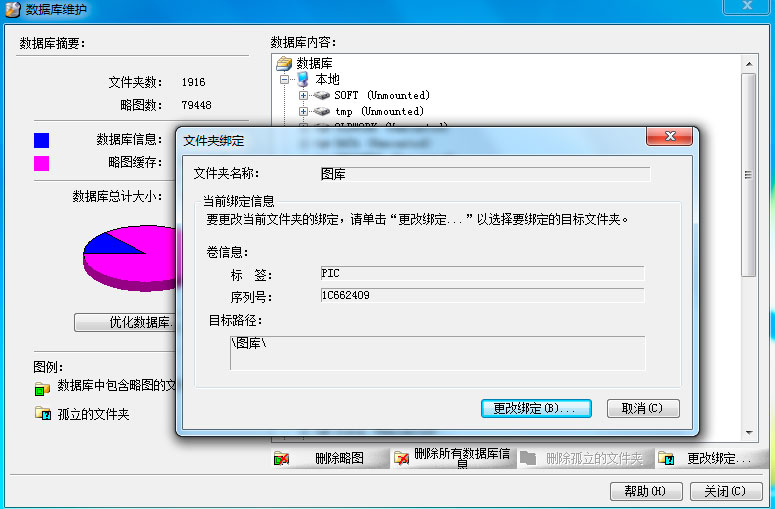
比如原先你照片“在C:pic”现在你放在了“E:pic”,那么就是打开“数据库维护界面”,应该显示出原来C盘是(Unmonted),不管,先打开C盘下的pic文件夹,这时候下方的“更改绑定”按钮会可以点,点击。这时候出现上面图片的界面,再点击更改绑定,选择你现在的E盘的pic文件夹。ok。

We use cookies to improve your experience on our site. By using our site, you consent to cookies.
Manage your cookie preferences below:
Essential cookies enable basic functions and are necessary for the proper function of the website.
These cookies are needed for adding comments on this website.
Statistics cookies collect information anonymously. This information helps us understand how visitors use our website.
Google Analytics is a powerful tool that tracks and analyzes website traffic for informed marketing decisions.
Service URL: policies.google.com
You can find more information in our Cookie Policy and Cookie Policy.
1 Comment
非常感谢,我也遇到了同样的问题,看了你的文章之后终于搞定了