win7优化大师快捷键冲突解决
win7优化大师安装后,默认“ctrl+alt+v”打开软件,但是这个快捷键与很多其他软件冲突。
遍寻win7优化大师中没有设置快捷键的地方(BS一下设计者),google后终于找到解决方法。
在“开始菜单-程序-win7优化大师”中右键win7优化大师的快捷键图标,选择“属性”,将快捷键一栏删除。
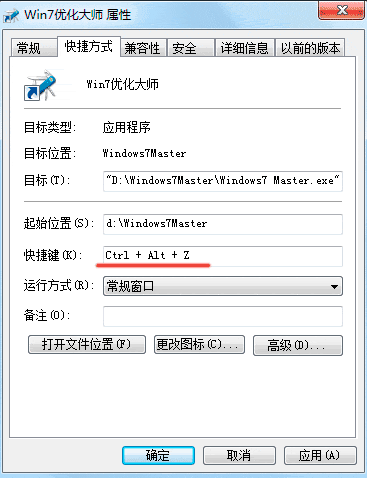
win7优化大师安装后,默认“ctrl+alt+v”打开软件,但是这个快捷键与很多其他软件冲突。
遍寻win7优化大师中没有设置快捷键的地方(BS一下设计者),google后终于找到解决方法。
在“开始菜单-程序-win7优化大师”中右键win7优化大师的快捷键图标,选择“属性”,将快捷键一栏删除。
We use cookies to improve your experience on our site. By using our site, you consent to cookies.
Manage your cookie preferences below:
Essential cookies enable basic functions and are necessary for the proper function of the website.
These cookies are needed for adding comments on this website.
Statistics cookies collect information anonymously. This information helps us understand how visitors use our website.
Google Analytics is a powerful tool that tracks and analyzes website traffic for informed marketing decisions.
Service URL: policies.google.com
You can find more information in our Cookie Policy and Cookie Policy.