让Adobe Dreamweaver CC支持ASP JSP

Adobe Dreamweaver CC默认不支持JSP、ASP和ASP.net文件的关联和语法着色,对于用这些语音编写的网站来说,使用Dreamweaver CC编辑网站是个不小的麻烦。
Adobe将JSP、ASP和ASP.net的支持作为扩展发放,如果要用这些功能,就需要给Dreamweaver CC手动添加这些扩展,扩展文件存放在程序安装文件夹里,在我机子上具体路径是: C:Program Files (x86)AdobeAdobe Dreamweaver CCconfigurationDisabledFeatures,在这个文件夹里有JSP_Support. mxp、ASP_JS_Support. mxp、ASPNet_Support. mxp这3个扩展包分别对应JSP、ASP和ASP.net。
在使用Adobe Extension Manager CC导入这些扩展包前需要把mxp格式转换成zxp格式,下面是格式转换步骤:
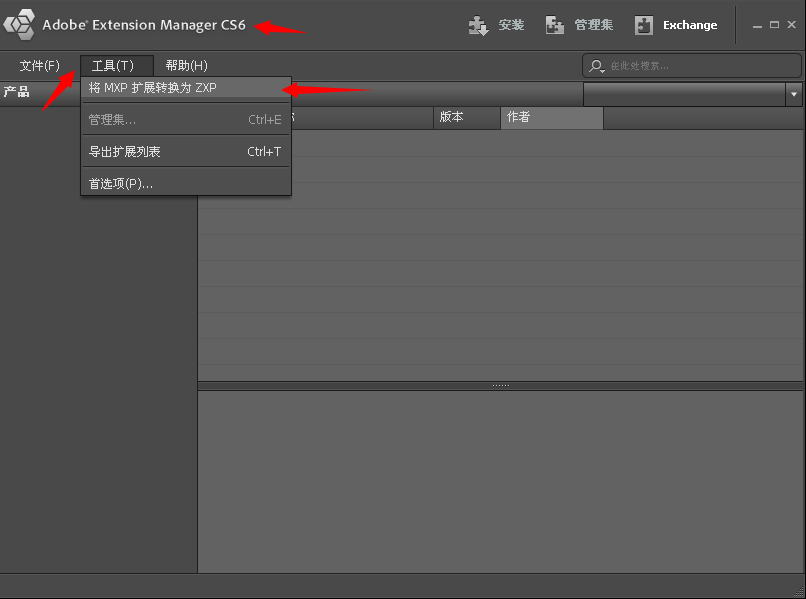
转换需要安装Adobe Extension Manager CS6,下载地址:这里下载(附上转换完毕的zxp文件,点击下载)
选择工具->将mxp扩展转换为zxp
打开路径
C:Program Files (x86)AdobeAdobe Dreamweaver CCconfigurationDisabledFeatures
选择mxp扩展
另存为zxp文件
确认成功。
打开Adobe Extension Manager CC,选择安装扩展。
选择要安装的扩展包,这里选择ASP_JS_Support。
接受协议
开始安装
安装成功后会显示在列表里。
在Adobe Dreamweaver CC 里就会出现ASP的扩展菜单并且会有语法着色。
[highlight_sc bg_color=#eeeeee text_color=#2c3e50 border_color=]后续:CC 2015版本开始这个方法没有成功,不过VSS这个工具也到了要被淘汰的时候了。但是TRS又不支持Dreamweaver,一种淡淡的忧桑。[/highlight_sc]