WordPress(宝塔)+XUI(vless+ws+tls)+Netflix

一、虚拟服务器搭建
1.云服务器选择
可以选择亚马逊云或者甲骨文云。
亚马逊云一年免费,甲骨文云终身免费。还有亚马逊Lightsail可以免费3个月。
选择新加坡区域,方便今后Netflix视频中文字幕,香港区域Netflix不支持土耳其礼品卡注册的Netflix账号
2.申请VPS虚拟机
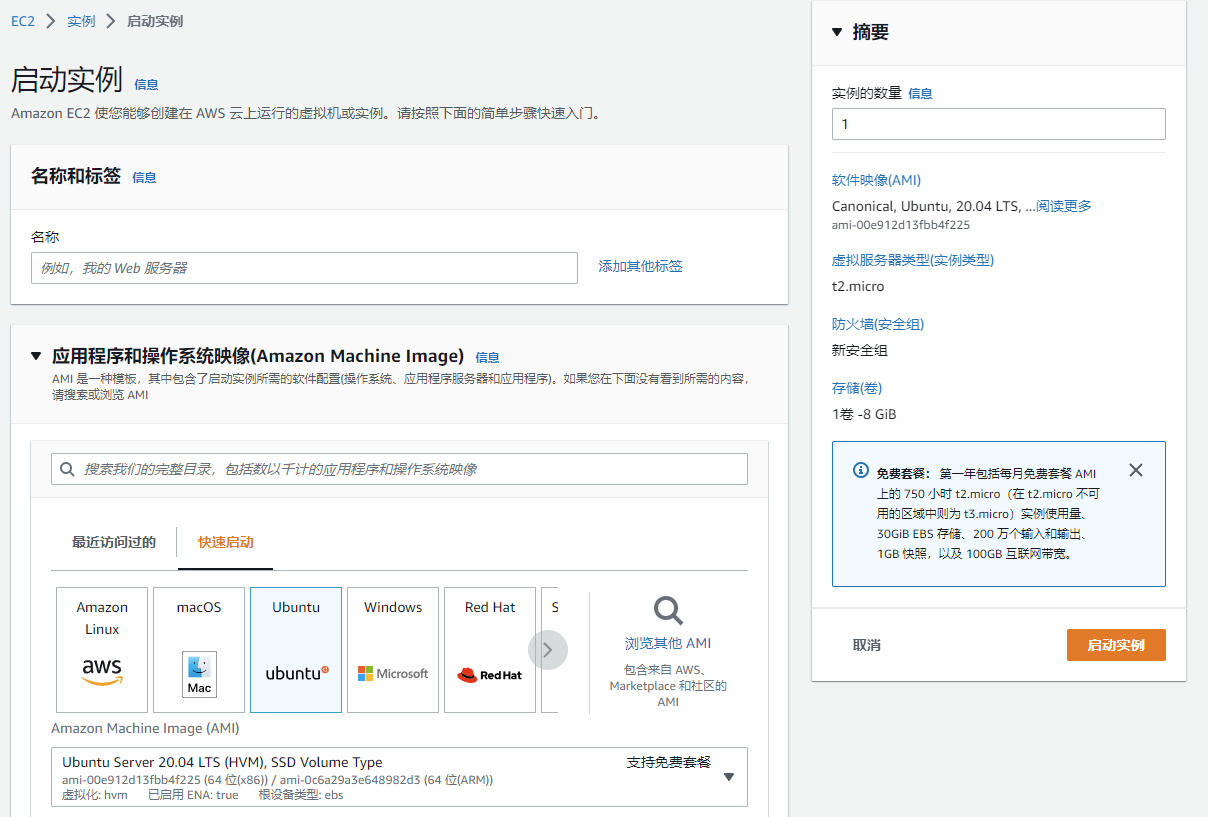
亚马逊云选择EC2,添加新“实例”。
实例配置如下:
系统:ubuu 20.04,选择免费版本(不要选22.04,warp脚本不支持)
实例类型:t2.micro或者t3.micro,选择免费版本
设置SSH的密钥对
设置安全组(后续放行建站所有需要的端口和协议)
实例存储:30G以内免费
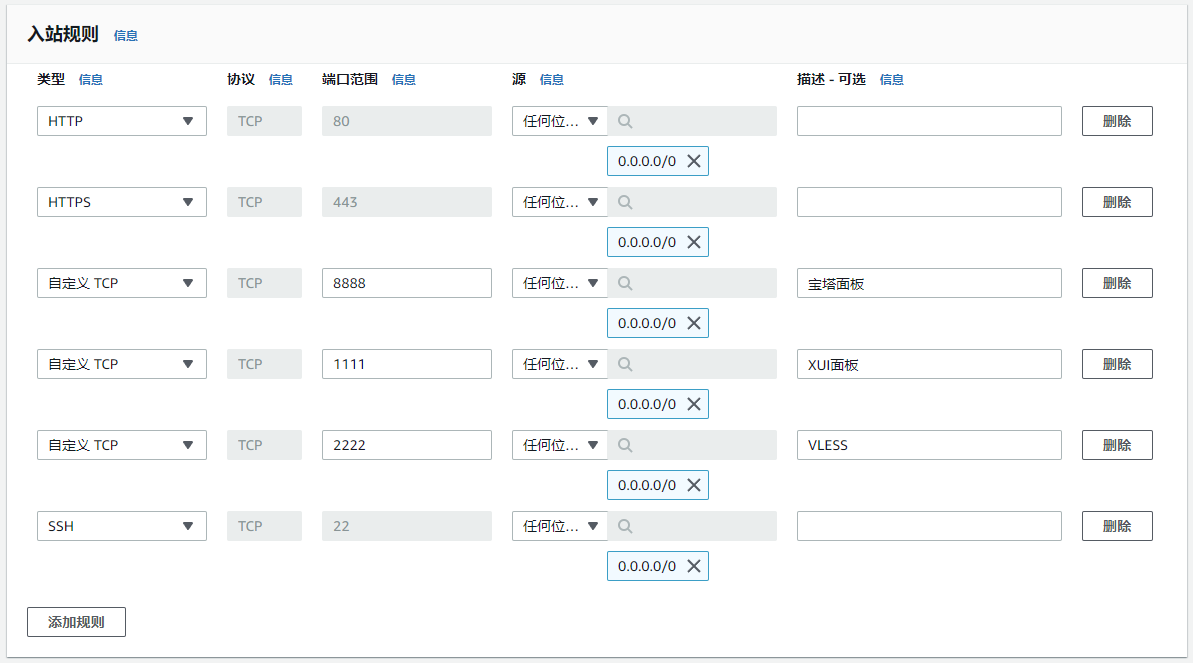
2.VPS安全组添加端口
添加以下端口:宝塔面板、XUI面板、VLESS协议
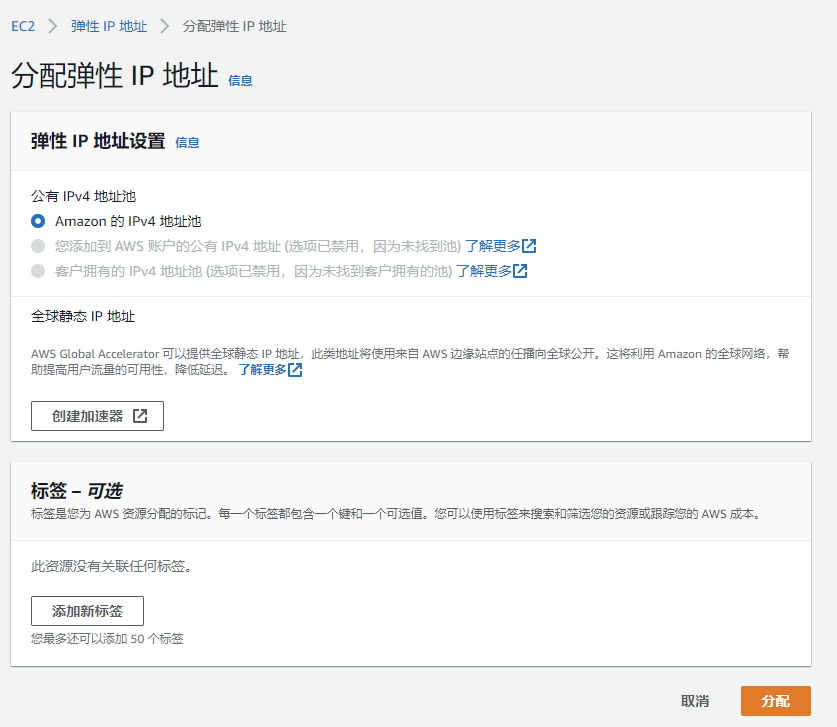
3.设置实例IP地址
可以开通弹性IP,绑定实例。获得固定的公网ip地址。并将虚拟机(实例)的ip记录下来。
二、域名申请和解析
1.申请域名
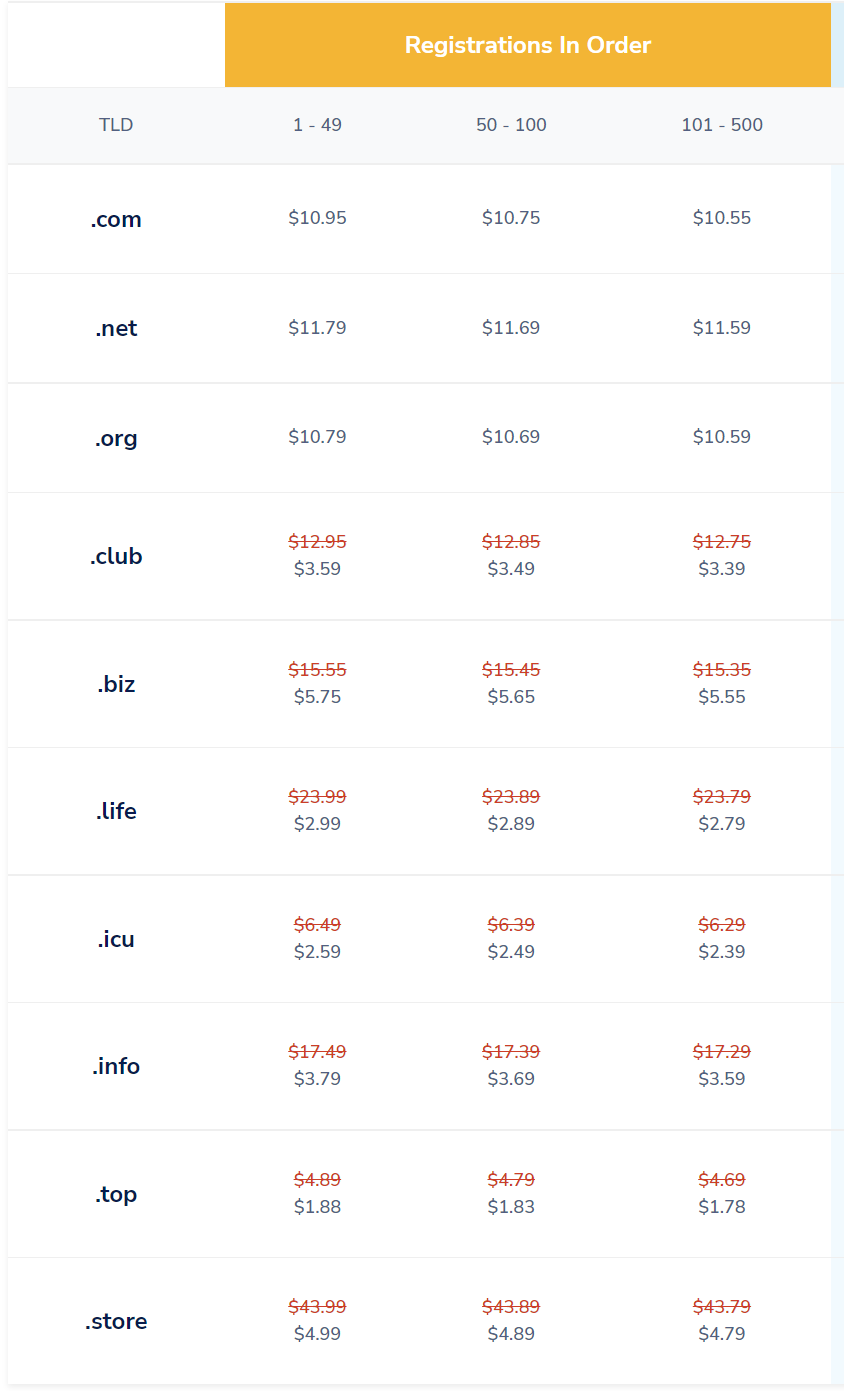
namesilo.com可以选择.top域名,费用较为便宜,如abc.top
2.域名挂入Cloudflare
在域名申请网站,将申请的域名的dns解析服务器改为Cloudflare的dns解析服务器。
Cloudflare DNS 服务器为:adelaide.ns.cloudflare.com和byron.ns.cloudflare.com
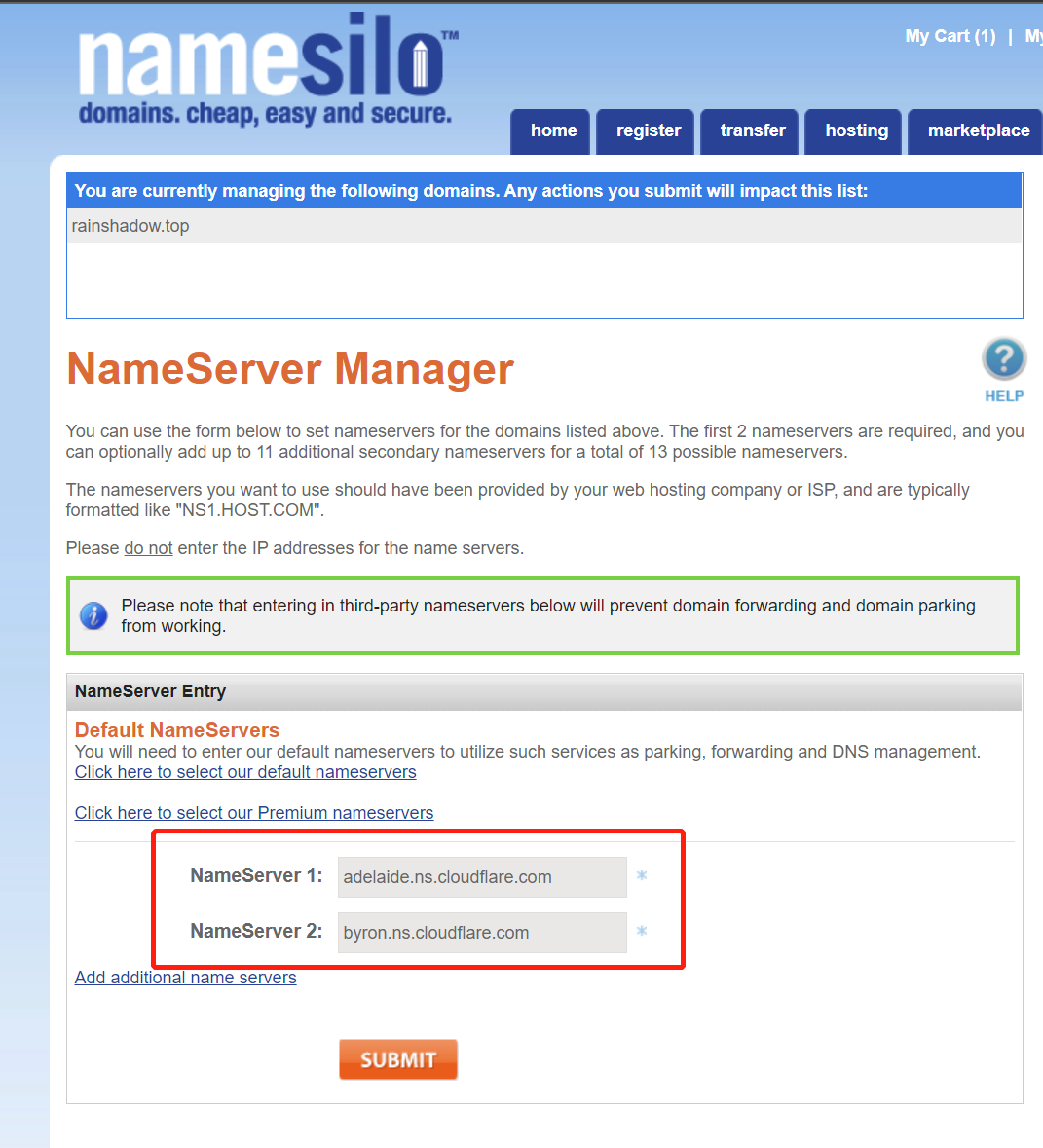
在Cloudflare.com,选择“网站”,添加站点,将申请的域名加入Cloudflare。

3.在Cloudflare做网站域名解析
选择左侧菜单“DNS”,在Cloudflare开通你需要的二级域名,如给blog,ip地址为虚拟机(亚马逊云实例)的ip地址。
同时打开小云朵,开启代理状态

4.开通域名Cloudflare的15年SSL证书
选择“SSL/TLS”/“源服务器”,申请SSL证书,将证书的公钥和私钥保存好。
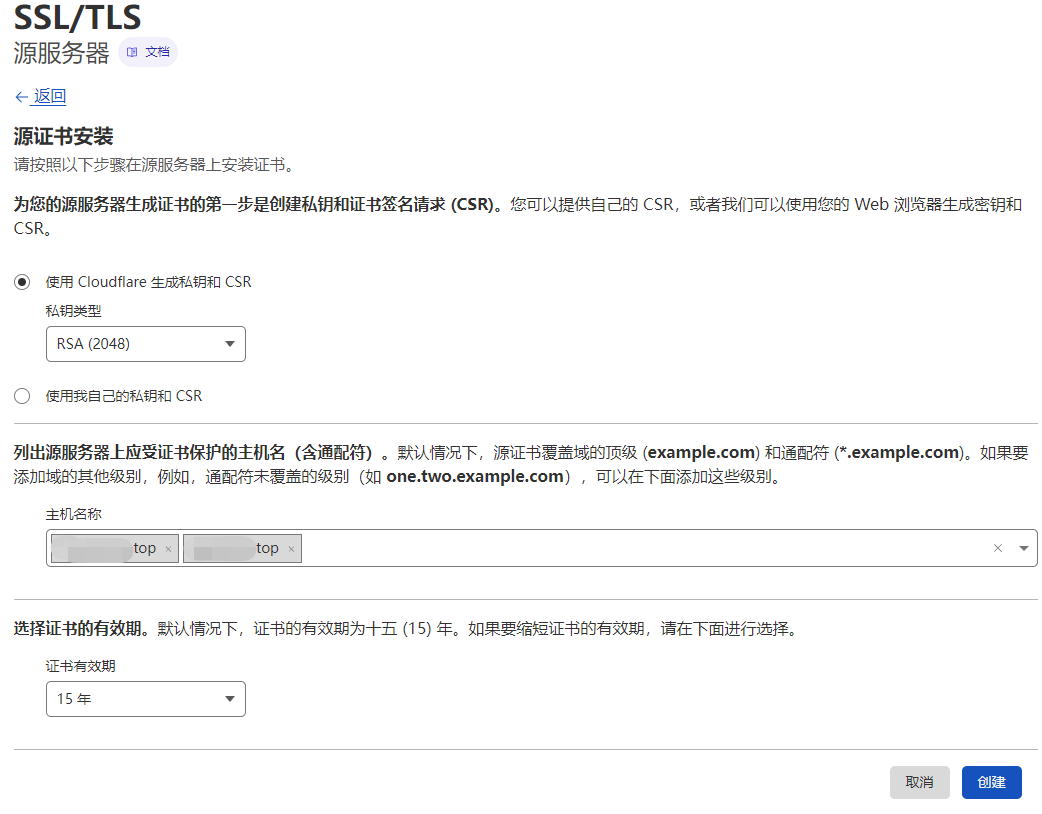
5.修改SSL模式
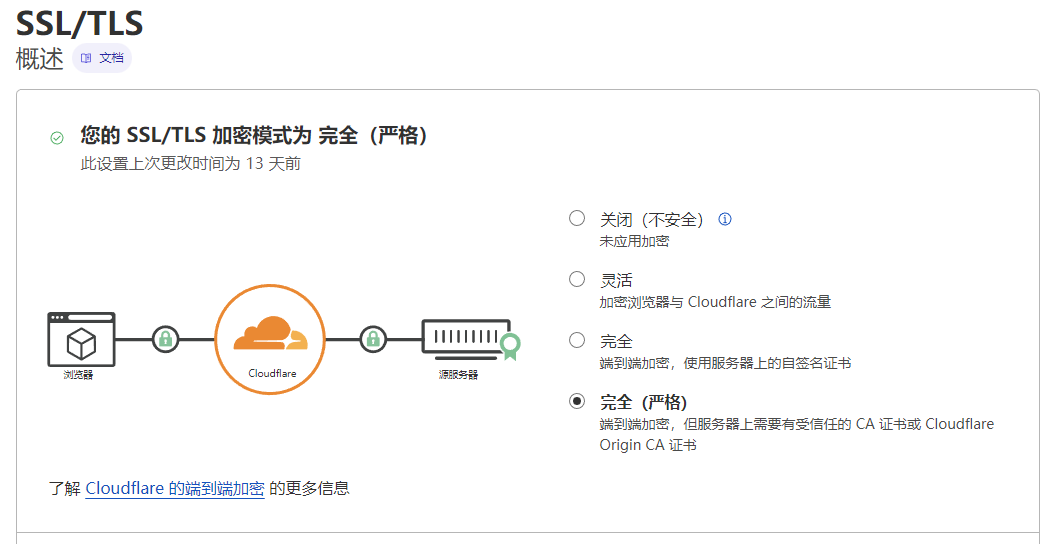
选择左侧菜单“SSL/TLS”/“概述”,将SSL模式改为“完全”或者“完全(严格)”
三、安装宝塔面板
1.升级ubuntu系统
	apt update -y
	apt install -y curl
	apt install -y socat
2.安装宝塔面板(10.0.0版,支持0.5G内存)
wget -O install.sh https://download.bt.cn/install/installStable.sh && sudo bash install.sh ed8484bec
3.安装运行环境
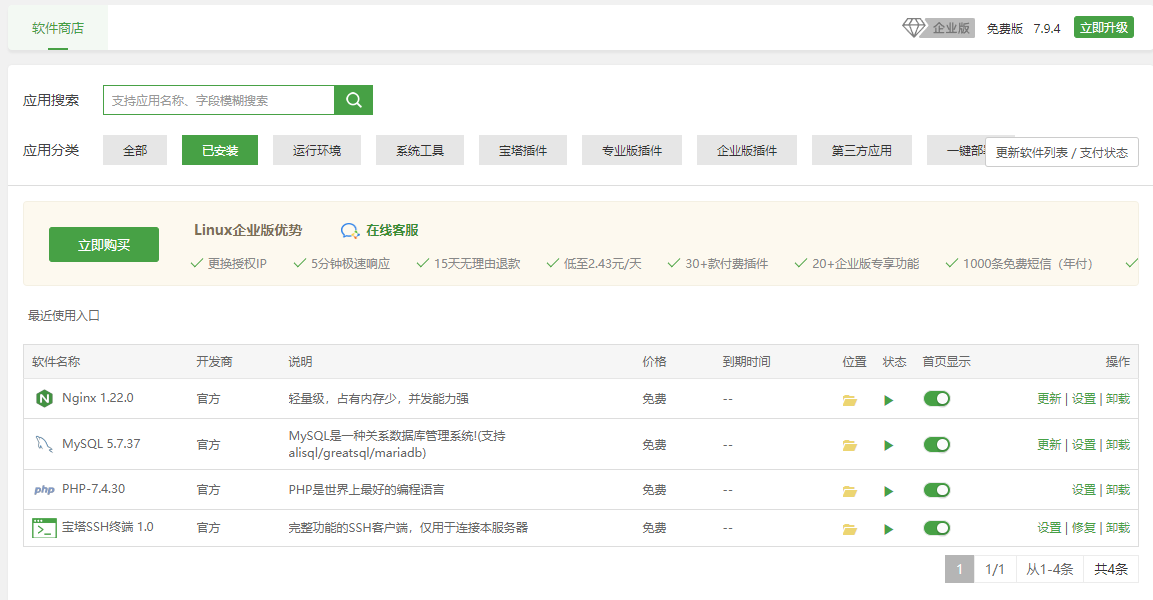
登录宝塔面板,在“软件商店”,安装Nginx1.22+PHP7.4+MYSQL5.7,选装phpMyAdmin5.0
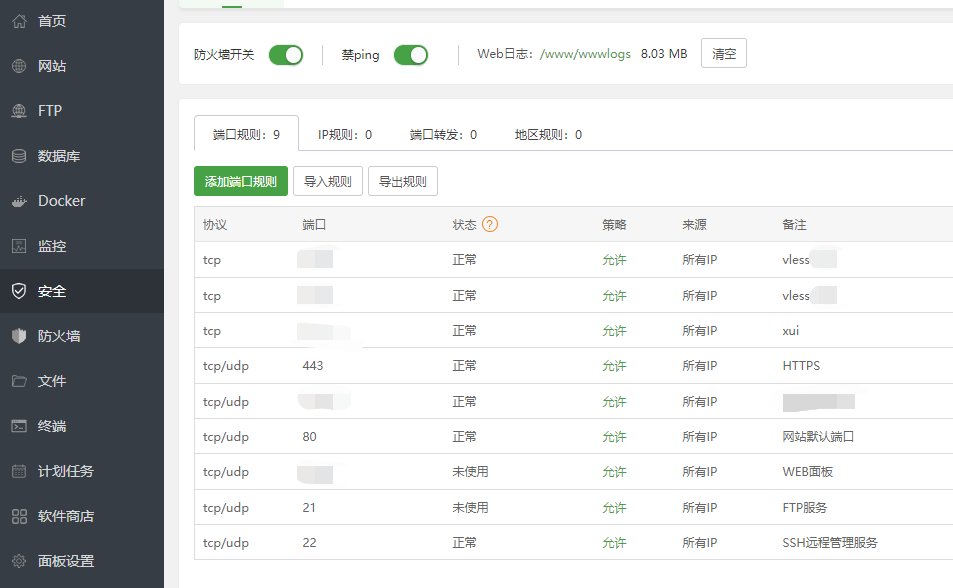
4.放行端口
在“安全”菜单,和vps安全组一样,放行相关端口。
后续要放行/禁用端口,宝塔面板和vps安全组要同时设置。
四、搭建Blog
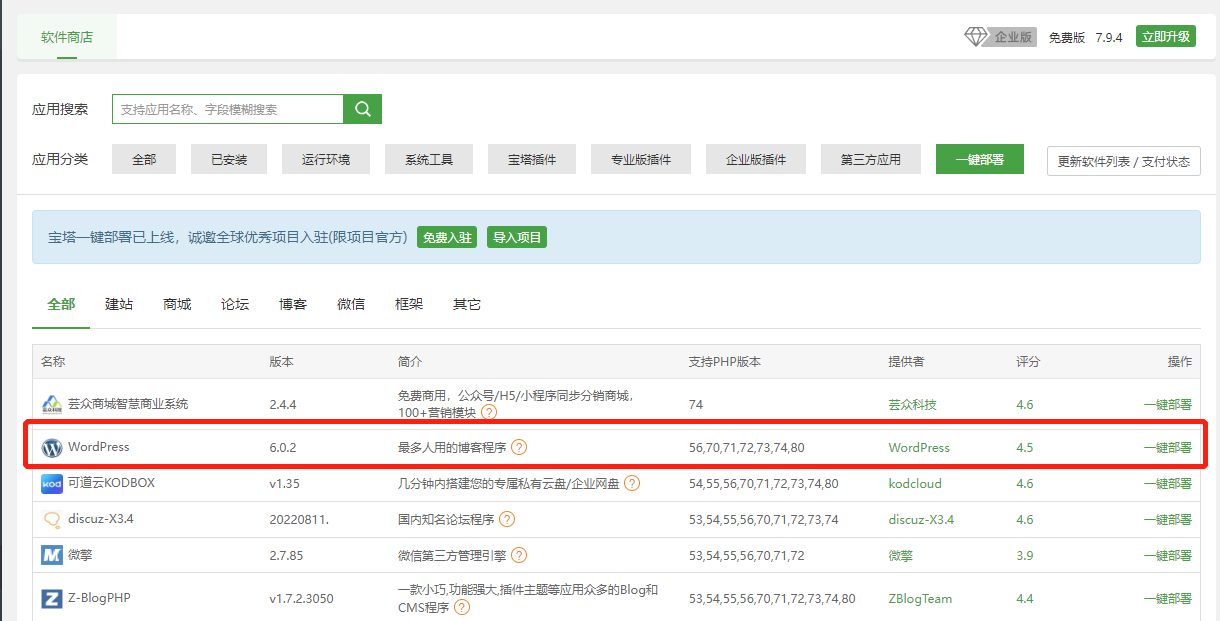
1.安装Wordpress
在“软件商店”,选择一键部署Wordpress。输入域名、数据库名称、密码。
2.wordpress宝塔面板设置
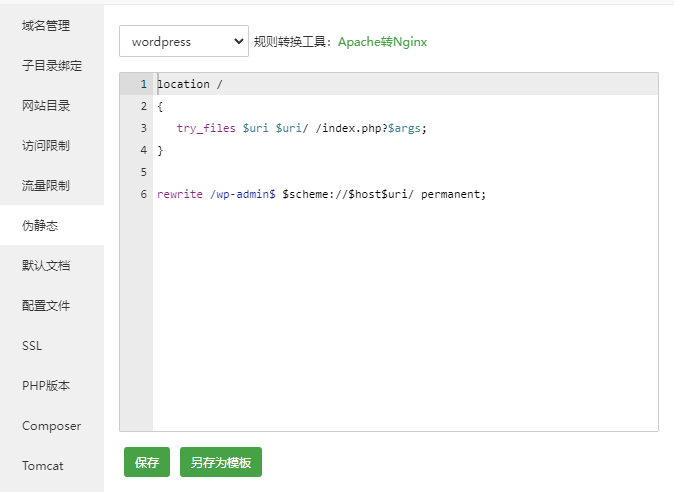
2.1″伪静态”
选择“wordpress”
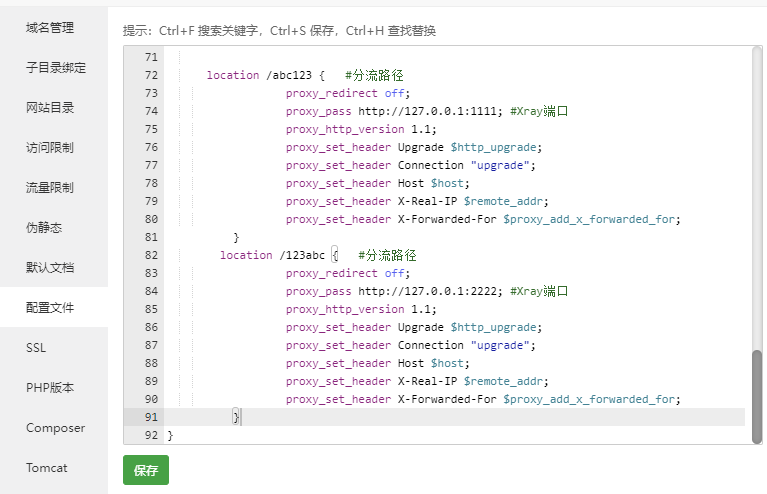
2.2″配置文件”
最后添加一段代码
location /abc123 {   #分流路径,可自定义
	proxy_redirect off;
	proxy_pass http://127.0.0.1:1111; #Xray端口,可自定义
	proxy_http_version 1.1;
	proxy_set_header Upgrade $http_upgrade;
	proxy_set_header Connection "upgrade";
	proxy_set_header Host $host;
	proxy_set_header X-Real-IP $remote_addr;
	proxy_set_header X-Forwarded-For $proxy_add_x_forwarded_for;
	        }
location /123abc {   #分流路径,可自定义
	proxy_redirect off;
	proxy_pass http://127.0.0.1:2222; #Xray端口,可自定义
	proxy_http_version 1.1;
	proxy_set_header Upgrade $http_upgrade;
	proxy_set_header Connection "upgrade";
	proxy_set_header Host $host;
	proxy_set_header X-Real-IP $remote_addr;
	proxy_set_header X-Forwarded-For $proxy_add_x_forwarded_for;
	        }
每一段location可以分流给一个用户使用,区别在代码中的“/abc123”和“1111”端口,每个用户使用不同设置,同时端口在vps安全组和宝塔面板中放行。
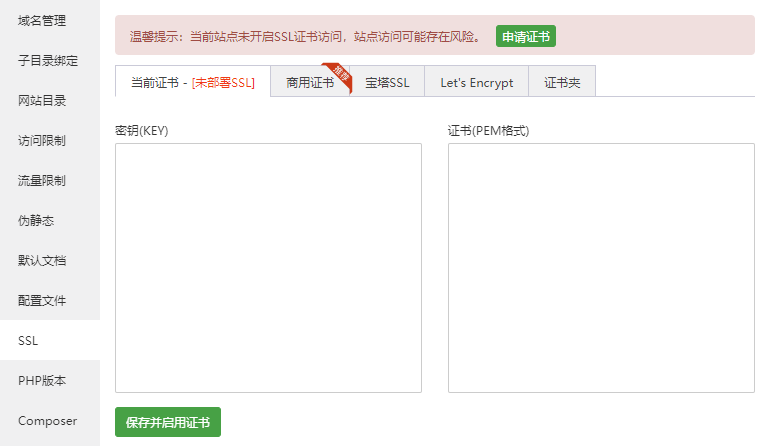
2.3 打开SSL
选择“当前证书”,“密钥”和“证书”分别输入之前申请的Cloudflare的15年SSL的私钥和公钥,然后打开“强制https“
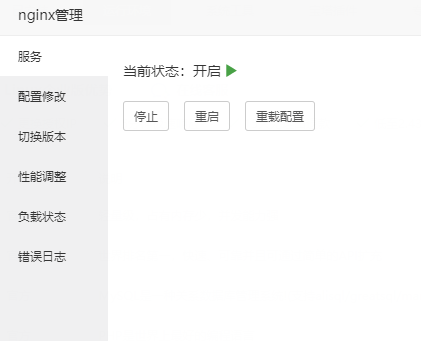
3.重新加载Nginx
五、XUI
1.安装XUI面板
bash <(curl -Ls https://raw.githubusercontent.com/FranzKafkaYu/x-ui/956bf85bbac978d56c0e319c5fac2d6db7df9564/install.sh) 0.3.4.4
设置用户名、密码和端口,同样端口记得vps安全组和宝塔面板放行
2.XUI面板设置
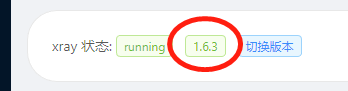
更新xray为最新版本
3.设置vless
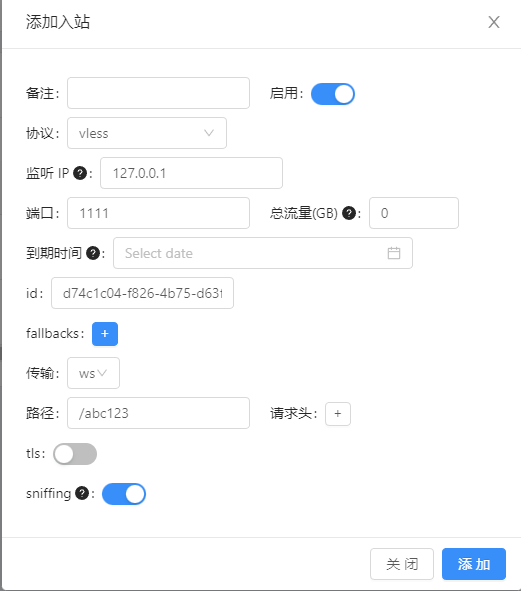
在”入站列表“,新建vless配置。
协议:vless
监听ip:127.0.0.1
端口:1111 #wordpress配置文件中保持一致
id:随意
传输:ws
路径:/abc123 #wordpress配置文件中保持一致
tls:关闭
4.配置出口
在”面板设置“/”xray相关设置”,根据后面warp刷netflix原生ip的脚本设置,分别按照warp使用ipv4,还是ipv6方式来看netflix进行设置。如果不用warp刷netflix原生ip,就是用原始代码。下面分别给出ipv4、ipv6和原始代码。设置后重启面板。
4.1 Netflix使用ipv4访问设置
{
  "api": {
    "services": [
      "HandlerService",
      "LoggerService",
      "StatsService"
    ],
    "tag": "api"
  },
  "inbounds": [
    {
      "listen": "127.0.0.1",
      "port": 62789,
      "protocol": "dokodemo-door",
      "settings": {
        "address": "127.0.0.1"
      },
      "tag": "api"
    }
  ],
  "outbounds": [
    {
       "tag":"IP6_out",
      "protocol": "freedom",
      "settings": {}
    },
{
      "tag":"IP4_out",
      "protocol": "freedom",
      "settings": {
        "domainStrategy": "UseIPv4"
      }
    },
    {
      "protocol": "blackhole",
      "settings": {},
      "tag": "blocked"
    }
  ],
  "policy": {
    "system": {
      "statsInboundDownlink": true,
      "statsInboundUplink": true
    }
  },
  "routing": {
    "rules": [
      {
        "inboundTag": [
          "api"
        ],
        "outboundTag": "api",
        "type": "field"
      },
      {
        "type": "field",
        "outboundTag": "IP4_out",
        "domain": ["geosite:netflix"]
      },
      {
        "type": "field",
        "outboundTag": "IP6_out",
        "network": "udp,tcp"
      },
      {
        "ip": [
          "geoip:private"
        ],
        "outboundTag": "blocked",
        "type": "field"
      },
      {
        "outboundTag": "blocked",
        "protocol": [
          "bittorrent"
        ],
        "type": "field"
      }
    ]
  },
  "stats": {}
}
4.2 Netflix使用ipv6访问设置
{
  "api": {
    "services": [
      "HandlerService",
      "LoggerService",
      "StatsService"
    ],
    "tag": "api"
  },
  "inbounds": [
    {
      "listen": "127.0.0.1",
      "port": 62789,
      "protocol": "dokodemo-door",
      "settings": {
        "address": "127.0.0.1"
      },
      "tag": "api"
    }
  ],
  "outbounds": [
    {
       "tag":"IP4_out",
      "protocol": "freedom",
      "settings": {}
    },
{
      "tag":"IP6_out",
      "protocol": "freedom",
      "settings": {
        "domainStrategy": "UseIPv6"
      }
    },
    {
      "protocol": "blackhole",
      "settings": {},
      "tag": "blocked"
    }
  ],
  "policy": {
    "system": {
      "statsInboundDownlink": true,
      "statsInboundUplink": true
    }
  },
  "routing": {
    "rules": [
      {
        "inboundTag": [
          "api"
        ],
        "outboundTag": "api",
        "type": "field"
      },
      {
        "type": "field",
        "outboundTag": "IP6_out",
        "domain": ["geosite:netflix"]
      },
      {
        "type": "field",
        "outboundTag": "IP4_out",
        "network": "udp,tcp"
      },
      {
        "ip": [
          "geoip:private"
        ],
        "outboundTag": "blocked",
        "type": "field"
      },
      {
        "outboundTag": "blocked",
        "protocol": [
          "bittorrent"
        ],
        "type": "field"
      }
    ]
  },
  "stats": {}
}
4.3 原始设置
{
  "api": {
    "services": [
      "HandlerService",
      "LoggerService",
      "StatsService"
    ],
    "tag": "api"
  },
  "inbounds": [
    {
      "listen": "127.0.0.1",
      "port": 62789,
      "protocol": "dokodemo-door",
      "settings": {
        "address": "127.0.0.1"
      },
      "tag": "api"
    }
  ],
  "outbounds": [
    {
      "protocol": "freedom",
      "settings": {}
    },
    {
      "protocol": "blackhole",
      "settings": {},
      "tag": "blocked"
    }
  ],
  "policy": {
    "system": {
      "statsInboundDownlink": true,
      "statsInboundUplink": true
    }
  },
  "routing": {
    "rules": [
      {
        "inboundTag": [
          "api"
        ],
        "outboundTag": "api",
        "type": "field"
      },
      {
        "ip": [
          "geoip:private"
        ],
        "outboundTag": "blocked",
        "type": "field"
      },
      {
        "outboundTag": "blocked",
        "protocol": [
          "bittorrent"
        ],
        "type": "field"
      }
    ]
  },
  "stats": {}
}
六、Netflix
1. 账号
可以购买土耳其礼品卡,费用比较低。需要土耳其线路开通账号充值。开通后可以改用其他地区线路,但是港区线路不能使用。
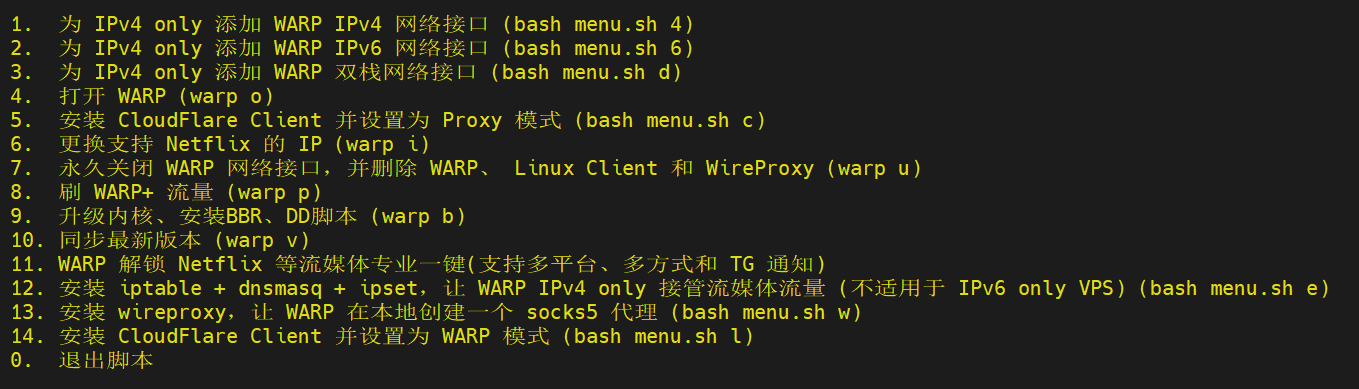
2.安装warp脚本刷原生ip
项目网址:https://gitlab.com/fscarmen/warp
wget -N https://gitlab.com/fscarmen/warp/-/raw/main/menu.sh && bash menu.sh [option] [lisence/url/token]
后续可以直接输入warp来运行
先选择简体中文,选择第2项使用warp ipv6,再选择warp账户为team账户,再选择更换支持netflix的ip
3.检测netflix原生线路情况
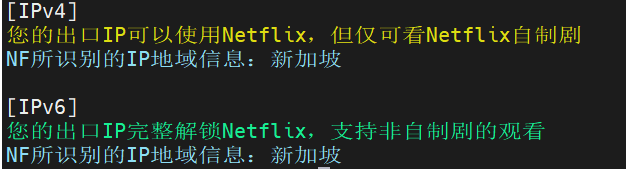
项目地址:https://github.com/sjlleo/netflix-verify
wget -O nf https://github.com/sjlleo/netflix-verify/releases/download/v3.1.0/nf_linux_amd64 && chmod +x nf && ./nf
后续可以直接输入./nf来运行
ipv6如果绿色表示线路已经支持原生ip
七、客户端
下载安装v2rayN客户端,添加vless服务器
服务器地址:blog.abc.top #blog的网址
端口:443 #不是xui的vless端口
用户id:d74********  #根据xui配置
传输协议:ws
路径:/abc123 #根据xui配置
传输层安全:tls
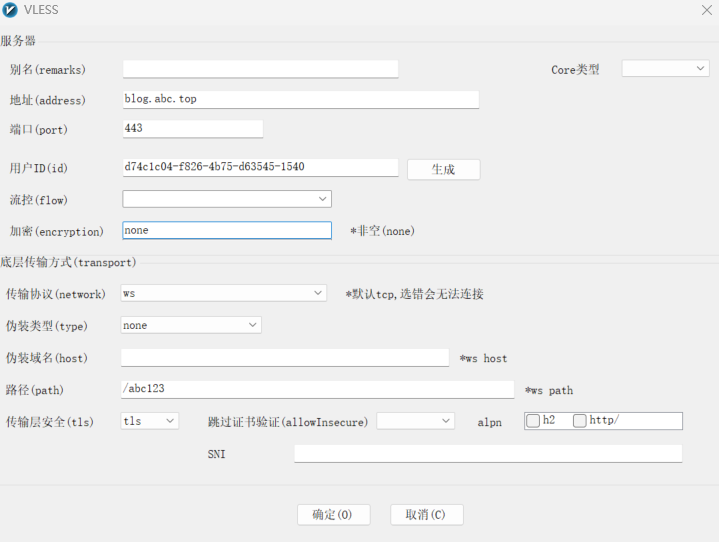
CTRL+R测试是否链接通了,并且CTRL+T测试下载速度。