安装adobe acrobat后word中的acrobat插件不能使用,显示“The Acrobat PDFMaker Server could not be loaded”。
解决方法:
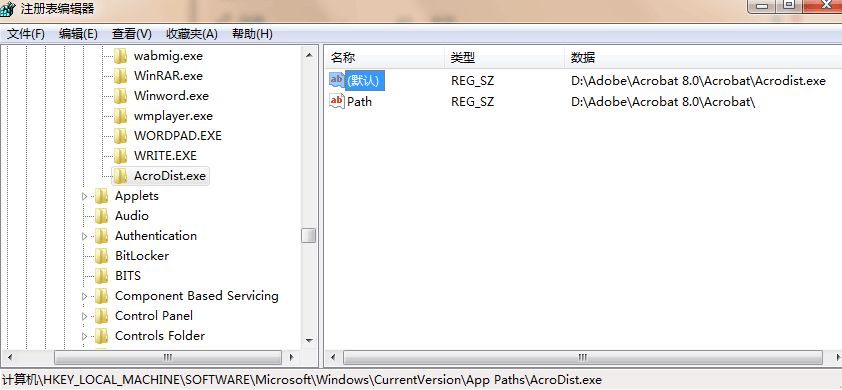
1、运行regedit,打开注册表。
2、在“HKEY_LOCAL_MACHINESOFTWAREMicrosoftWindowsCurrentVersionApp Paths
”下新建项“AcroDist.exe”
3、在AcroDist.exe项下,修改“默认”值“D:AdobeAcrobat 8.0AcrobatAcrodist.exe”(acrobat版本不同及安装路径不同请根据实际情况修改)
4、在AcroDist.exe项下,新增字符串,名称“Path”,值“D:AdobeAcrobat 8.0Acrobat”(acrobat版本不同及安装路径不同请根据实际情况修改)
再打开word后就可以使用acrobat插件了。

We use cookies to improve your experience on our site. By using our site, you consent to cookies.
Manage your cookie preferences below:
Essential cookies enable basic functions and are necessary for the proper function of the website.
These cookies are needed for adding comments on this website.
Statistics cookies collect information anonymously. This information helps us understand how visitors use our website.
Google Analytics is a powerful tool that tracks and analyzes website traffic for informed marketing decisions.
Service URL: policies.google.com
You can find more information in our Cookie Policy and Cookie Policy.