修正步骤:
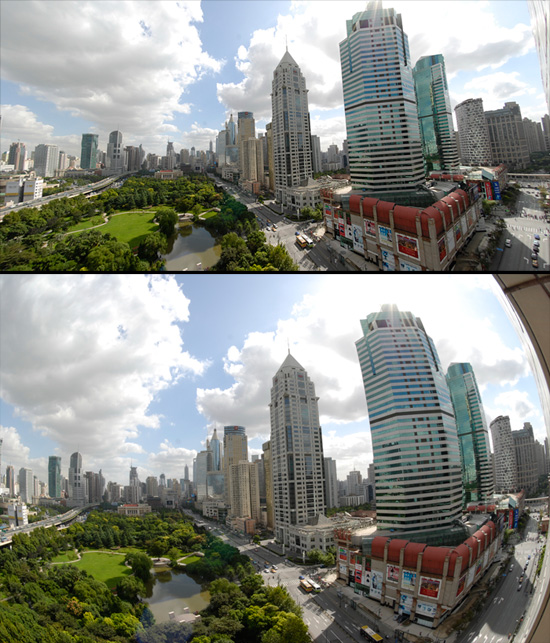
1、Capture NX 2,有个相机和镜头调整,用鱼眼拍的照片,有个专门修正的选项。并且选上“包括没有图像数据的部分”
2、房子倾斜的修复,PS,用“自由变形”,按住CTRL+ALT+SHIFT,拖动右上方的控制点,将房子基本拉成垂直。
3、图片外侧拉升的修复。PS,复制图层,选择“Filer”/“Distort”/“Lens Correction”。右侧选择“Transform”,拖动下方Horizontal Perspective。2个图层都这么操作,区别一个往左拖,一个往右拖。这样每个图层都有一半是压缩了。各需要执行2次,图片就基本差不多了。然后蒙版不要的一半,ok。
处理下来图像质量损失比较大,可以锐化一下。
We use cookies to improve your experience on our site. By using our site, you consent to cookies.
Manage your cookie preferences below:
Essential cookies enable basic functions and are necessary for the proper function of the website.
These cookies are needed for adding comments on this website.
Statistics cookies collect information anonymously. This information helps us understand how visitors use our website.
Google Analytics is a powerful tool that tracks and analyzes website traffic for informed marketing decisions.
Service URL: policies.google.com
You can find more information in our Cookie Policy and Cookie Policy.